When working in my office during the day, I enjoy having my windows open to get as much natural light in as possible. However, this sometimes comes at a cost: glare. During certain times of the day, if there is little cloud cover, I get too much glare on my computer screen and it creates eye-strain, or makes reading difficult or distracting. So I took it upon myself to automate this problem away! This post outlines the process I took and how it works.
Convert a Physical Problem into a Digital Problem
I want to open and close my blinds automatically. This requires something that can physically control my blinds and expose an API or service which Home Assistant can call to make the physical state match the desired state. For this I chose to use a few of the SwitchBot Blind Tilt controllers. SwitchBot has a gold quality integration that makes use of ESPHome Bluetooth Proxies.
Once setup, the SwitchBot app is no longer needed, you can have complete control with Home Assistant. If you have multiple windows facing the same direction, you can create a group to control them all with a single entity. If you have windows facing different directions, you will need a separate glare sensor and automation for each direction since the frustum angles will differ.

Automating the “Glare” State
The desired logic is the window blinds should be open if all of the following are true, else closed:
- the sun is above the horizon (there is daylight outside)
- it is not cloudy
- the sun is not directly visible from my seated position (either to my eyes or reflected on my screen)
The first two can be determined by using the sun and weather entities in Home Assistant, but that last one requires some math.
Calculating Glare Frustum
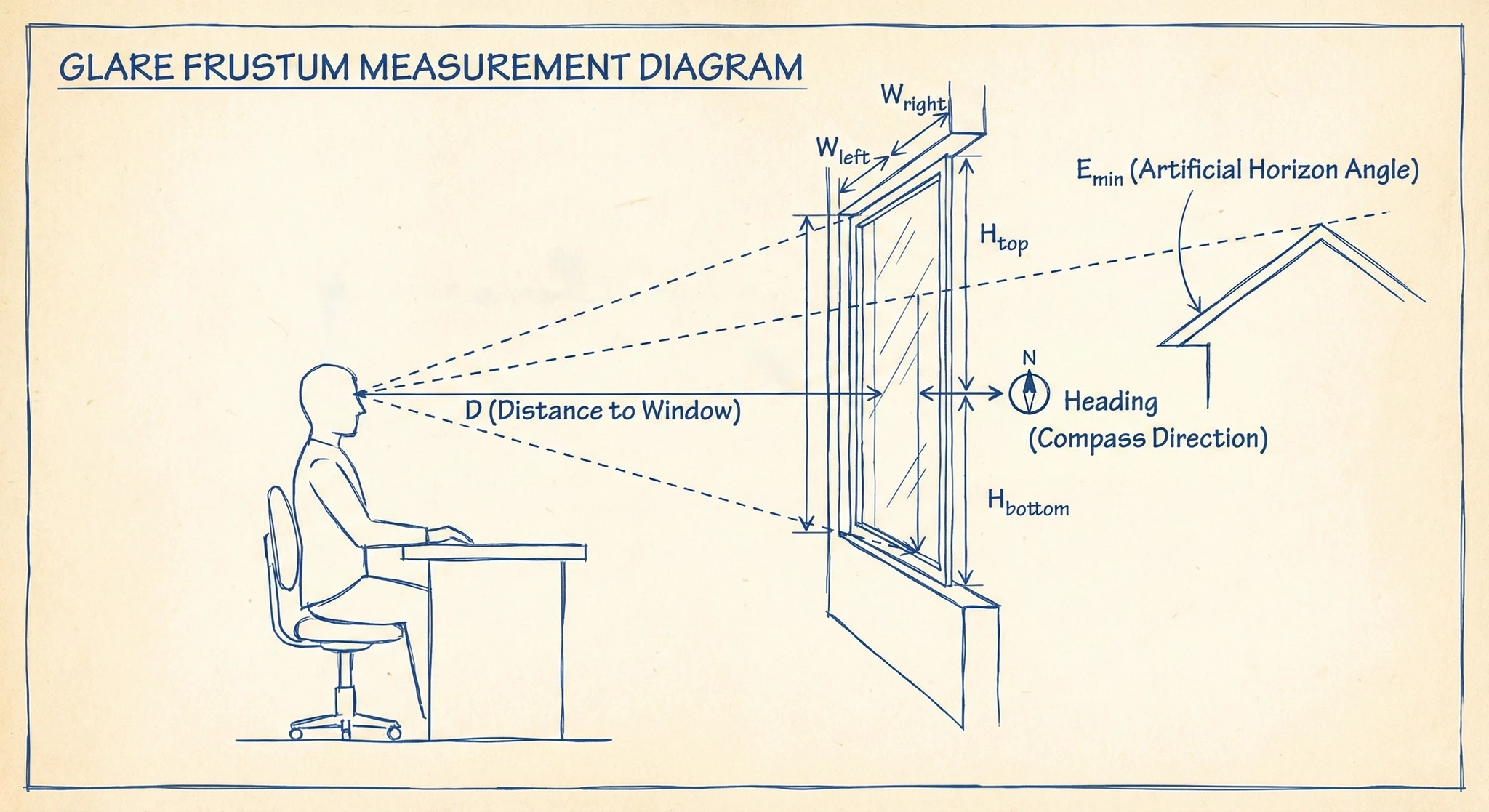
In order to mathematically determine if there is glare, we need to determine the frustum between my eyes, and the window, relative to each other. This provides a projected bounding box to compare to the position of the sun using its azimuth and elevation.
To calculate this, we need:
- window heading (which compass direction it faces — use a compass app on your phone pointed perpendicular out through the window)
- distance between eyes and window
- distance between center of eyes and:
- window’s horizontal left edge
- window’s horizontal right edge
- vertical top of window
- vertical bottom of window

Once these measurements are taken, we can calculate the solar Azimuth and Elevation bounds for which there is glare.
Take these measurements and enter their values in the following python script to calculate the boundaries. The variable names match the labels in the diagram above.
import math

# --- INPUTS: REPLACE THESE WITH YOUR MEASUREMENTS ---
# Units don't matter (cm/inches) as long as they are consistent.

# 1. Compass direction your window faces (0=N, 90=E, 180=S)
HEADING = 90

# 2. Distance from eye to window glass
D = 100

# 3. Horizontal Offsets (Positive numbers)
# How far LEFT of your nose is the left window edge?
W_LEFT = 50
# How far RIGHT of your nose is the right window edge?
W_RIGHT = 50

# 4. Vertical Offsets (Positive numbers)
# How far UP from eye level is the top of the glass?
H_TOP = 40
# How far DOWN from eye level is the bottom of the glass?
H_BOTTOM = 10

# 5. Artificial Horizon (Optional)
# If structures outside the window (neighbor's roof, fence, etc.) block
# the sun below a certain angle, set E_MIN to that angle in degrees.
# Set to 0 if there are no obstructions.
E_MIN = 0

# --- ALGORITHM ---

def calculate_angles():
    # 1. Calculate Field of View angles relative to the "Center Line" of sight
    # arctan(opposite / adjacent) * (180 / pi)

    # Horizontal angles (relative to straight ahead)
    angle_left = math.degrees(math.atan(W_LEFT / D))
    angle_right = math.degrees(math.atan(W_RIGHT / D))

    # Vertical angles (relative to horizon/eye-level)
    angle_up = math.degrees(math.atan(H_TOP / D))
    angle_down = math.degrees(math.atan(H_BOTTOM / D))

    # 2. Convert to World Coordinates (Azimuth & Elevation)
    # Azimuth: North is 0.
    # If looking out window (HEADING), Left is (-), Right is (+)

    az_min = HEADING - angle_left
    az_max = HEADING + angle_right

    # Sun elevation is relative to the horizon (0°).
    # The sun is never below the horizon, so min elevation defaults to 0.
    # Use E_MIN to account for structures blocking the sun at low angles.
    # Max elevation is the angle from eye level to the top of the window.
    el_min = max(E_MIN, 0.0)
    el_max = angle_up

    print("-" * 30)
    print("HOME ASSISTANT CONFIGURATION VALUES")
    print("-" * 30)
    print(f"Azimuth Min: {az_min:.1f}")
    print(f"Azimuth Max: {az_max:.1f}")
    print(f"Elevation Min: {el_min:.1f}")
    print(f"Elevation Max: {el_max:.1f}")
    print("-" * 30)

if __name__ == "__main__":
    calculate_angles()
Glare Template Sensor
Now that the Azimuth and Elevation boundaries are calculated, we can create a binary template sensor in Home Assistant to reflect the current glare state.
In order to make the automation even simpler, the template will also take into consideration the current weather cloud coverage.
Replace the values below with the bounds returned by the python script. You may also need to update the weather provider if a different one is in use.
template:
  - binary_sensor:
      - name: "Office Glare"
        unique_id: office_glare
        icon: mdi:sun-angle
        state: >
          {# --- SENSOR INPUTS --- #}
          {% set az = states('sensor.sun_solar_azimuth') | float(0) %}
          {% set el = states('sensor.sun_solar_elevation') | float(0) %}
          {% set clouds = state_attr('weather.pirate_weather', 'cloud_coverage') | float(0) %}

          {# --- WINDOW CONFIGURATION --- #}
          {# The compass direction range where the window is visible #}
          {% set az_min = 92.0 %}
          {% set az_max = 138.4 %}

          {# The vertical range (Horizon -> Window Top) #}
          {# Min is 15.0 due to neighbor's roof blocking sun below that angle #}
          {% set el_min = 15.0 %}
          {% set el_max = 33.0 %}

          {# --- WEATHER CONFIGURATION --- #}
          {# Glare only happens if clouds are low. (0-100 scale) #}
          {% set cloud_threshold = 30 %}

          {# --- LOGIC --- #}
          {% set is_aligned_horizontally = az_min <= az <= az_max %}
          {% set is_aligned_vertically = el_min <= el <= el_max %}
          {% set is_clear_sky = clouds < cloud_threshold %}

          {{ is_aligned_horizontally and is_aligned_vertically and is_clear_sky }}
Once created, the sensor binary_sensor.office_glare returns an on state when the sun is in a position that would cause glare, and off otherwise.
If your window faces near North, the azimuth range may wrap around 0°/360° (e.g., 350° to 10°). In that case, change is_aligned_horizontally to use or instead of and: az >= az_min or az <= az_max.
Solar Glare Automation
Now that the glare sensor is created, an automation is needed to control the blinds given the glare and sun state. The blinds should only be open when the sun is up AND there is no glare; otherwise they close. The glare trigger uses a 2-minute buffer to prevent the blinds from rapidly toggling on partly cloudy days.
The SwitchBot Blind Tilt uses tilt_position values from 0 to 100, where 0 is fully closed and 50 is fully open (horizontal). Values above 50 tilt the blinds the other direction.
The following automation does that:
alias: Office Blinds
mode: single
triggers:
  - trigger: sun
    event: sunset
  - trigger: sun
    event: sunrise
  - trigger: state
    entity_id:
      - binary_sensor.office_glare
    for:
      minutes: 2
actions:
  - if:
      - condition: sun
        before: sunset
        after: sunrise
      - condition: state
        entity_id: binary_sensor.office_glare
        state: "off"
    then:
      - action: cover.set_cover_tilt_position
        data:
          tilt_position: 50
        target:
          entity_id: cover.office_blinds
    else:
      - action: cover.set_cover_tilt_position
        data:
          tilt_position: 0
        target:
          entity_id: cover.office_blinds
After running this for a few days, you may need to adjust the boundaries a little. Here are some tips:
- Glare starts before blinds close? Decrease
az_minorel_minto widen the start of the glare range. - Blinds close but there’s no glare yet? Increase
az_minorel_minto narrow the start of the glare range. - Blinds open but there’s still glare? Increase
az_maxorel_maxto widen the end of the glare range. - Blinds close on overcast days? Increase
cloud_threshold. - Blinds close when sun is behind a roof/structure? Increase
el_min.
Once you get the values correct, it is very stable. Since the values for the sun’s Azimuth and Elevation are used, the calculations should work year round, even as the angle of the sun changes season to season.