Linux Arbitrary File Write and Privilege Escalation with dd

The disk group seems innocent enough - it’s meant for disk management utilities. But give someone disk group access and you’ve essentially handed them root. Here’s how to exploit raw block device access to bypass all file permissions and escalate privileges. While the XKCD comic above is tongue-in-cheek, using dd for filesystem manipulation is genuinely powerful and dangerous. The Linux disk group allows raw access to disks on the system. It’s meant to allow members to use tools to manage disk partitions and format disks at the block level. However, it can also be used to get arbitrary file read/write by directly editing the disk contents even if file system permissions forbid it. For this reason it is a very privileged group and should be considered equivalent to root access. ...


January 28, 2026 · 7 min · Ian Foster

Influencing Linux IP Source Address Selection

When creating a socket unless manually specified, the OS will automatically determine the source address to use. However, the OS’s default choice may not always be desired. Source Address Selection allows for influencing the sources address chosen by the OS. What is Source Address Selection? When a host with multiple routable IP addresses sends a packet to another host, it needs to determine which of its local addresses to use as the source “from” address. ...

December 11, 2024 · 7 min · Ian Foster

Remove SNAP from Ubuntu

Recent versions of Ubuntu are shipping with Snapcraft by default, and some of the default applications run inside a snap as well. Snaps are application containers, similar to Docker, but designed for desktop applications. Unfortunately Canonical seems to be pushing Snaps hard, and they are not always wanted. This is made worse by not providing an easy way to remove the snap functionality for Ubuntu. The commands bellow will entirely remove snap from an Ubuntu installation. ...

February 19, 2022 · 1 min · Ian Foster

Ambergris

For those of you not in the know, ambergris is defined as: a wax-like substance that originates as a secretion in the intestines of the sperm whale, found floating in tropical seas and used in perfume manufacture. However, that will not be what this post is about (sorry to disappoint). Instead, I’ll present what happens when building an image on Docker that contains a reverse shell in the Dockerfile. ...

January 19, 2017 · 7 min · Ian Foster

How to Compile a Linux Kernel for Android

A while ago I was working on building a custom kernel for my Android phone. Once you get the source the compilation process is not as straightforward as I hoped. Here are the steps required to get from the kernel source to a flashable image for your phone. Get a copy of the build toolchain and Linux kernel for your device First download a copy of the pre-build toolchain from git. ...

May 27, 2013 · 3 min · Ian Foster

Adding Hibernate to the CrunchBang Linux shutdown menu

By default CrunchBang Linux does not have hibernation support enabled in the shutdown menu. The reason for being excluded is likely because not all computers support hibernation. However most modern computers will support it. To add a hibernation option just download this file and place it in the bin directory of your home folder: “~/bin/” and make it executable with: chmod +x cb-exit cb-exit Gist If you want to test your system to see if it can handle hibernation run the following command. If your system supports it you should be able to successfully enter and exit hibernation: ...

May 25, 2013 · 1 min · Ian Foster

LDAP Authentication for Cakephp

This article is going to help you using LDAP to authenticate users rather than relying on a users table with a password column. I will be assuming you will be using cakephp 1.3 and that you have completed Auth and/or ACL setup on your application similar to the ACL tutorial on the cakephp book. Because we want to control the logging in of the user ourselves and not leave it to the cake magic we need to override the auth component. To do this copy your auth.php from your CAKE_CORE/controllers/components/ to your APP/controllers/components/ folder. Next open it up and fine the login function. It should be around like 684. Once you find it comment out everything inside the function, but leave the function intact. It should look something like this: ...

March 25, 2011 · 4 min · Ian Foster

PHPRepo

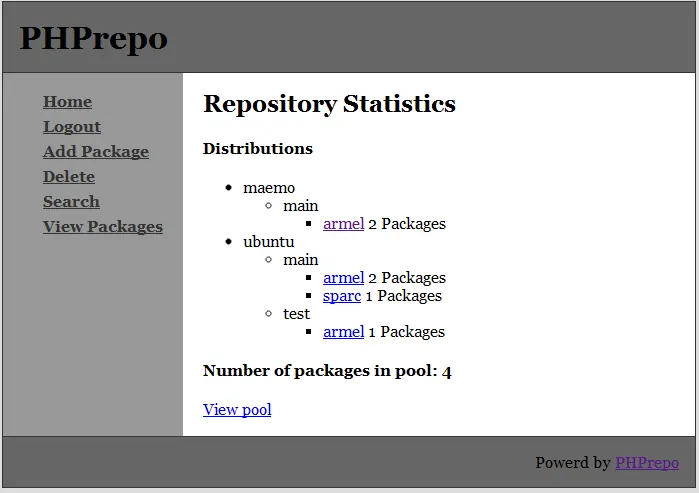
This is about a piece of software I wrote over a year ago to fit a need I had at the time. It probably will not receive any updates but I have released the source to anyone is free to do as they please with it. Background PHPRepo is a PHP CMS for managing Debian package repositories. A while ago I wanted to start my own repository for some of my own packages, so I looked for an easy way to do this. I found none. At the time the only way to run and manage a Debian package repository was through apt at the command line, and since at the time I was learning PHP I decided to write my own software to fill this void. Thus I created PHPRepo. PHPRepo has very minimal requirements and can work alongside an existing repository that is managed with apt. ...

December 22, 2010 · 3 min · Ian Foster

Install Debian on Android

This is a minimalistic how-to to get a Debian environment running on almost any (rooted) android phone. I adopted the method here: https://www.saurik.com/id/10 to be more universal and added some new features. Preparing the Debian Image You will need access to a computer running a Debian based distribution to create the image for you phone. I used Ubuntu 10.04. To create the image you need to install a program called debootstrap. debootstrap will allow you to create a mini Debian install in your image. ...

October 7, 2010 · 4 min · Ian Foster

Use Active Directory for Linux logins

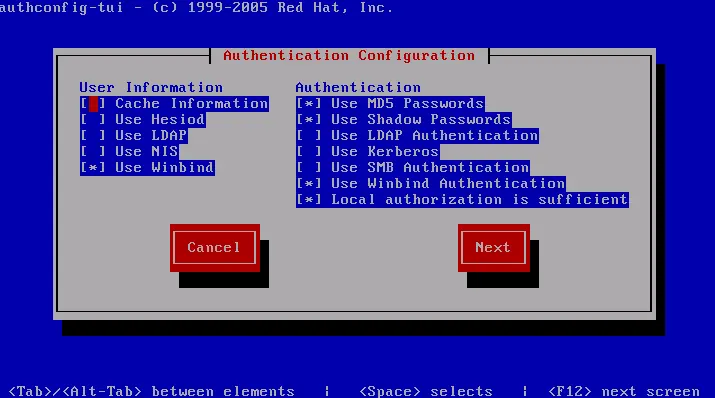
This is a simple how-to on using Microsoft’s Active Directory for user authentication on Linux systems. The method described in this guide should work for Cent OS, Red Hat Enterprise Linux (RHEL), and Fedora. Debian based distributions do not have the tools used in this method and require a different setup. This guide used Cent OS 5.5 with a minimal text only install, however it should apply the same to other compatible versions of Linux. ...

September 5, 2010 · 3 min · Ian Foster

Building a PXE Server

PXE is a method for booting an operating system over a network, it stands for Pre-Executable environment. Here I will show you how to build a PXE server to boot and or install operating systems over your network. Installing the server OS I made this server inside VMWare, however the steps are the same if you are using a different virtual machine server or a physical machine. I used Debian 5.0 and used the net-install iso. Since we will only be needing a bare Debian install and just a few extra packages there is no need to download/install the entire OS. ...

April 19, 2010 · 4 min · Ian Foster

Switch Network Interface in Linux

This guide will tell you how to rename or switch network controller names in Linux. Often when installing Linux the installer will automatically pick the names of the network controllers. And for some reason the order it names them is almost always not the order I want them in. I usually like the primary/on-board card eth0, and all additional cards eth1-n, however the installer often has its own ideas. So this is how to correct it! ...

April 8, 2010 · 2 min · Ian Foster

SSH Tips and Tricks

Part 1 - Screen Screen is a program that can create virtual terminals inside your current session. If you are familiar with tabbed web browsers, think of screen as adding tabs to your terminal. And if your server allows it can allow you to disconnect sessions and keep them running in the background, even if you log out. You can install screen on Debian with apt-get by running sudo apt-get install screen and yum install screen for rpm based systems. ...

March 31, 2010 · 5 min · Ian Foster

Conky

Conky is a system monitor for Linux. It can tell you almost anything about your computer, such as CPU usage, memory usage, network information, and almost anything else. Here is what my Conky configuration looks like on my desktop. To install Conky on a RPM based distribution run yum install conky Or on a Debian based distribution run sudo apt-get install conky To get yours to look like that you need to put a file named .conkyrc in your home folder. Your home folder is usually /home/$USER. ...

November 15, 2009 · 4 min · Ian Foster

Extract, Compile, and Install Anything in Linux

From time to time every Linux user will run across a program that does not come in a nice packaged DEB or RPM. Often these come in the form of a tar.gz, tgz, tar.bz, tar, gz, tar.bz2 or tbz2 format. This is how you can make use of them. Remember to have a compiler installed and any dependencies for the software you are installing. Extract To uncompress your file run the following command that applies to your extension. ...

November 15, 2009 · 1 min · Ian Foster